Turn every Android device in your home into a Wi-Fi sensor. See signal, latency, packet loss and disconnections for each device, live on one beautiful web dashboard.
Free to useNo ads or trackingYour data, your Firebase
-39 dBmSignal · Excellent
13 msGateway ping
20+
Live metrics per scan
24/7
Background monitoring
5 min
Automatic scan interval
Free
On Google Play
Why WiFi Monitor Plus
Stop guessing why your Wi-Fi drops
Speed tests show one moment. WiFi Monitor Plus records your network around the clock, from every device, so you can see the real story.
Real-Time Monitoring
Continuous Wi-Fi insights from your devices, running quietly in the background.
Multi-Device Home
Phones, tablets and laptops in the same home, compared side by side.
Easy Log Upload
Collect and share diagnostics with one tap. Ideal for support and ISP tickets.
Connected Device Insights
See device details, LAN neighbours and connection information at a glance.
Admin Dashboard
Your whole network, one screen
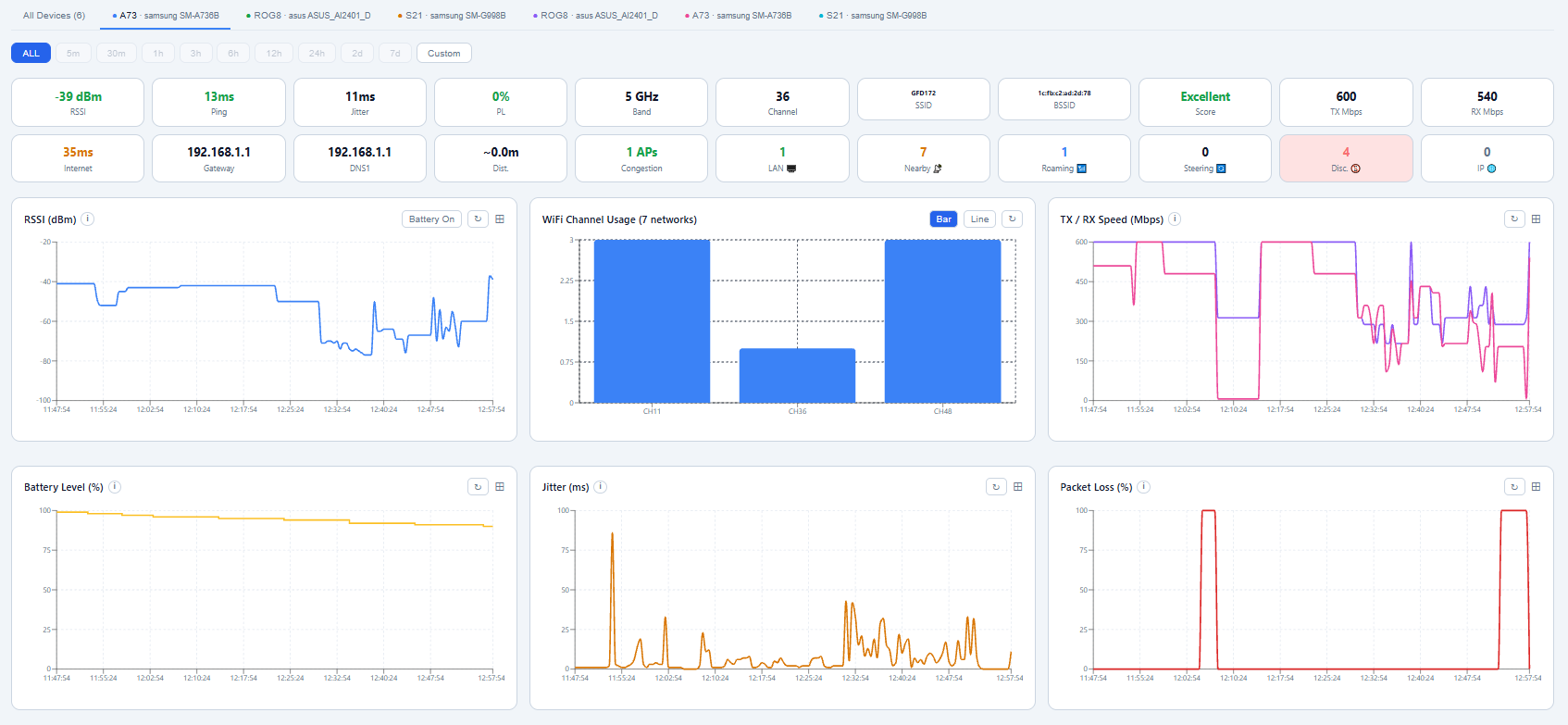
Every device reports to a live web dashboard. Switch between devices, zoom into any time range and spot problems the moment they happen.
WiFi Monitor Plus · Admin Dashboard
⤢ Click to enlarge
01
Per-device tabs
Jump between every phone, tablet and laptop in the home, or view all devices together.
02
Flexible time ranges
From the last 5 minutes to 7 days, or any custom window you choose.
03
Interactive charts
RSSI, channel usage, TX/RX speed, jitter, packet loss and battery, in a layout you control.
What we measure
20+ metrics. Every single scan.
Each scan captures a full snapshot of your connection, from radio signal to internet reachability.
Signal & radio · RSSI, band, channel, link speed, distance estimate and quality score
Performance · gateway and internet ping, jitter and packet loss
Events · disconnections, roaming, band steering and public IP changes
Environment · nearby networks, channel congestion and LAN devices
-39 dBm
RSSI
13 ms
Ping
11 ms
Jitter
0%
Packet loss
5 GHz
Band
36
Channel
Excellent
Score
600
TX Mbps
540
RX Mbps
35 ms
Internet
1 AP
Congestion
7
Nearby
1
Roaming
0
Steering
4
Disconnects
0
IP changes
Capabilities
Built for people who want real answers
Signal Quality
Track RSSI, signal score, band, channel and estimated distance from the access point.
Ping & Latency
Continuous gateway and internet pings with jitter and packet loss tracking.
Disconnection Detection
Every drop is logged with its duration and the signal level right before it happened.
Roaming & Band Steering
See when devices hop between access points or get pushed between 2.4 and 5 GHz.
Channel Congestion
Find out how many nearby networks are competing on your channel and band.
LAN Device Scanner
Discover devices on your local network and track how many are connected over time.
Public IP Tracking
Know the moment your public IP changes, a common sign of ISP-level resets.
Battery Correlation
See whether power saving is quietly hurting your Wi-Fi performance.
History & Trends
Interactive charts with custom time ranges to reveal patterns across days.
Get started
Up and running in three steps
1
Create a home
Open the web dashboard and create a home. You get a unique invite code that never changes.
35189U
2
Join from each device
Install the app from Google Play, connect to your Wi-Fi and enter the home code to link the device.
3
Press START
The app scans in the background and streams results to your dashboard. That's it.
Private by design
Your scan data is stored in your own Firebase project. We don't run a central server that collects it, and we never sell or share it. Delete individual records or your entire home from the dashboard at any time.
Yes. Download the app from Google Play and start monitoring your home network at no cost.
Why does the app need location permission?
Android requires location permission (and Nearby Wi-Fi Devices on Android 13+) for any app that reads Wi-Fi network details or scans nearby networks. WiFi Monitor Plus uses it only for Wi-Fi scanning.
How many devices can I monitor?
Install the app on any Android device in your home and join it with the same home code. Each device appears as its own tab on the dashboard, plus an "All Devices" view.
Will it drain my battery?
Scans run every few minutes in a lightweight foreground service. The app also records battery level, so you can see the effect for yourself on the dashboard.
Where is my data stored?
In a Google Firebase / Firestore database tied to your home. Only your devices and your dashboard access it. See the privacy policy for details.
Know your Wi-Fi. Starting today.
Free on Google Play. Set up your home in under two minutes.